
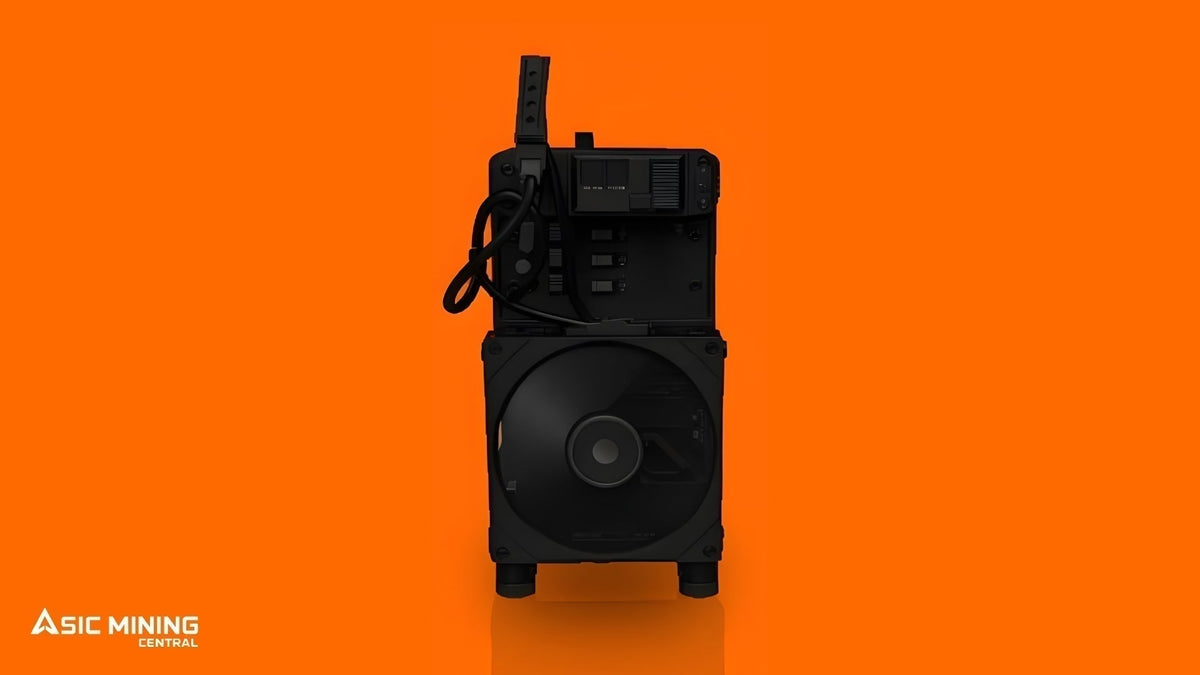
The NerdMiner NerdQaxe++ Rev 6.1 is a compact SHA-256 ASIC built for home Bitcoin mining. On paper, it delivers 6 TH/s in full mode, draws 100W, and runs at 16.7 J/Th efficiency. Those numbers give you a clear starting point, but on their own they don't tell the whole story.
So in this guide, we'll dig into the Rev 6.1 properly: hashrate, power consumption, efficiency, electricity cost, real profitability, the setup it needs, and the practical checks worth doing before you buy, plus where it sits next to a few other well-regarded home mining machines.
What Is the NerdQaxe++ Rev 6.1?
The NerdQaxe++ Rev 6.1 is an open-source-inspired ASIC built specifically for SHA-256, the algorithm Bitcoin runs on. It isn't a regular computer with mining software bolted on; it's purpose-built hardware, which means it can't mine other algorithms like Scrypt or Equihash. One job, done well.
That distinction matters before you spend a cent. Every ASIC is tied to one algorithm, and Bitcoin (or Bitcoin-based) mining needs SHA-256 hardware. The Rev 6.1 fits that category nicely, just at a home-mining scale rather than an industrial one. It's part of the wider NerdMiner lineup, which spans several revisions and hashrate tiers built around the same small-footprint, low-power idea.
If you're curious about running your own Bitcoin miner without needing a warehouse, three numbers matter most at the start: hashrate, power draw, and efficiency. Together, they tell you what the device can realistically do and what it costs to keep running.
It's worth being just as clear about what the Rev 6.1 isn't. It's not a farm-scale machine, and it's not trying to go toe-to-toe on raw output with units that pull thousands of watts. Its appeal is the opposite of that: a small, quiet footprint that fits on a shelf, a power draw low enough to basically vanish on a normal electricity bill, and enough real hashrate that solo mining and hands-on learning feel genuinely worthwhile rather than just symbolic.
Why Should Buyers Review the Specs Practically Before Buying?
A mining device can look great on a spec sheet and still land very differently once it's running in your actual home, at your actual electricity rate. The listed hashrate is only part of the picture.
That's why the Rev 6.1 is worth looking at from three angles rather than one. First, the machine itself: hashrate, power, efficiency, size, and noise. Second, the running cost: your electricity rate, your expected uptime, and what's realistically left after the power bill. And third, whether your setup even fits it: a WiFi connection, a stable outlet, and a spot where a quiet little fan won't bother anyone.
A device with attractive specs can be hard to justify if electricity is pricey, while a modest one can make perfect sense if it's cheap to run and you're mostly there to learn rather than earn. Look at all three angles together, instead of fixating on the hashrate alone, and you get a far more honest buying picture than any single earnings estimate could give you.
Main Specifications of Rev++ 6.1

|
Specification |
Details |
|
Manufacturer |
|
|
Model |
NerdQaxe++ Rev 6.1 |
|
Algorithm |
SHA-256 |
|
Primary Coin |
Bitcoin |
|
Hashrate (Full / Eco) |
6 TH/s / 4.8 TH/s |
|
Power (Full / Eco) |
100W / 70.6W |
|
Efficiency (Full / Eco) |
16.7 J/TH / 14.7 J/TH |
What Does 6 TH/s Hashrate Mean?
Hashrate is how fast a miner solves the math puzzles that secure the Bitcoin network. The Rev 6.1 is rated at 6 TH/s in full mode; that's 6 trillion calculations a second, dropping to 4.8 TH/s in eco mode to save power.
Here's the thing, though: hashrate isn't profit. It only tells you the mining capacity. What that capacity is actually worth comes down to Bitcoin's price, network difficulty, pool performance, uptime, and your electricity cost. Plenty of buyers see a hashrate number, plug it into a calculator once, and treat the answer as final, but that's really just step one. The better move is to use hashrate to understand what the device is built to deliver, then work out what it costs to keep that running every single day.
It's also worth knowing where that hashrate goes once the device is live. Mine solo, and every share you find is a shot at the full block reward, with nothing shared along the way. Mine through a pool instead, and that same hashrate gets spread across many participants, trading a small pool fee for smaller, steadier payouts. Neither approach changes the Rev 6.1's raw hashrate; it changes how that hashrate turns into what actually lands in your wallet.
How Much Power Does It Use?
Power consumption is what decides the ongoing cost of running the Rev 6.1. In full mode, it draws 100W (0.1 kW); in eco mode, 70.6W (0.0706 kW). And since a miner usually runs continuously rather than switching on and off, that draw becomes a real daily expense.
A simple formula gives you the daily electricity use: power in watts ÷ 1000 × 24 = daily kWh.
For full mode: 100 ÷ 1000 × 24 = 2.4 kWh per day. For eco mode: 70.6 ÷ 1000 × 24 = 1.69 kWh per day. That's a fraction of what larger ASICs burn through, which is precisely why the Rev 6.1 happily runs off a normal home outlet with no special wiring.
How Electricity Cost Changes the Result
Your electricity rate can genuinely change how the Rev 6.1 stacks up as a purchase. The same device looks reasonable in one location and harder to justify in another, purely because of the local power rate.
|
Electricity Rate |
Daily Power Cost (full mode, 2.4 kWh) |
Monthly Power Cost |
|
$0.05/kWh |
~$0.12 |
~$3.60 |
|
$0.08/kWh |
~$0.19 |
~$5.76 |
|
$0.10/kWh |
~$0.24 |
~$7.20 |
|
$0.15/kWh |
~$0.36 |
~$10.80 |
These are electricity-only estimates, with no pool fees or downtime folded in. Still, the pattern jumps right out: because this device sips so little power to begin with, even a "high" rate only comes to a few dollars a month, which is exactly why it's worth lining that cost up against expected revenue before deciding whether it clears the bar for you.
Why J/Th Efficiency Matters And How Rev 6.1 Compares with Other Home Miners
Efficiency shows how much electricity a miner uses for the output it produces, measured in joules per terahash (J/Th). The formula is power in watts ÷ hashrate in TH/s. For the Rev 6.1's full mode, that's 100 ÷ 6 = 16.7 J/Th; in eco mode, 70.6 ÷ 4.8 = 14.7 J/Th.
Lower J/Th is better; think better mileage in a car. Put another way, a 20 J/Th miner is a fuel-sipping bike next to a 30 J/Th miner's gas-guzzling truck, for the same distance covered. And since electricity is the main ongoing cost of mining, this is the number that really decides whether a device is worth running at your local rate.
The Rev 6.1 is a genuinely good home-mining option, and it sits comfortably alongside a handful of other well-regarded small-scale miners worth knowing about if you're putting together a home setup:
|
Home Miner |
Hashrate |
Power |
Efficiency |
Good For |
|
6 TH/s |
100W |
16.7 J/Th |
Maximum desk-mining speed |
|
|
4.8 TH/s |
70W |
14.6 J/Th |
Beginner-friendly solo mining |
|
|
8.4 TH/s |
140W |
16.7 J/Th |
Hydro-cooled, higher output |
|
|
12 TH/s |
240W |
20.0 J/Th |
Higher-output home solo mining |
They all share the same basic DNA: small, quiet SHA-256 devices aimed at home use and solo mining rather than commercial output. There's no single "best" here; they just cover slightly different needs. The Rev 6.1 balances speed and efficiency well for a desk setup, the Bitaxe Gamma trims the power draw a touch further for beginners, and the Bitaxe Gamma Hex and NerdOCTAxe Rev 3.1 give up a bit of efficiency for meaningfully more hashrate if bigger output is what you're after.
How Do Power and Efficiency Work Together to Decide Returns?
Mining returns come from two places at once: the hardware, and the market around it. The hardware side is fixed: 6 TH/s hashrate, 100W power draw, 16.7 J/Th efficiency. The market side never sits still: Bitcoin's price, network difficulty, and pool fees.
Because the hardware profile is fixed and known, you can estimate electricity cost precisely and compare return scenarios with real confidence. But the number that actually matters isn't gross revenue- what the device earns before any costs come out. It's net return: what's left after electricity, and after pool fees if you're mining through a pool rather than solo. A device can flash a believable-looking daily revenue figure and still leave almost nothing once the power bill is paid, which is exactly why efficiency and electricity rate deserve as much attention as hashrate does.
Is the Rev 6.1 Profitable?
Honest answer? It depends entirely on live data, and it shifts daily. The hardware specs are fixed: 6 TH/s, 100W, 16.7 J/Th, but profitability moves with Bitcoin's price, network difficulty, pool fees, and your electricity rate.
Rather than quote one fixed number that'll be stale within weeks, it's far more useful to show how to check it yourself. A live mining profitability calculator lets you enter the Rev 6.1's hashrate and power draw alongside your own electricity rate for a current estimate, instead of leaning on a snapshot that may no longer match the market.
As a worked example using recent conditions (Bitcoin near $77,000 and network difficulty near 127T), the Rev 6.1 in full mode generates only a few tenths of a cent in Bitcoin a day, enough to sit roughly break-even below about $0.10/kWh, and to run at a loss above it, before any hardware cost is even counted. That's not a knock on the device; it just reflects where Bitcoin's price and difficulty sit today versus back when small SHA-256 miners first caught on. The better question isn't "how much does it earn," it's "how much is left after electricity," and whether that trade-off still makes sense for you as a solo Bitcoin miner chasing a full block reward, rather than as a steady income source.
Why Are Mining Returns Always Changing?
Mining returns won't stay put, even when the hardware runs at the same hashrate every single day. That's because the market underneath it keeps moving. Bitcoin's price rises and falls, network difficulty adjusts roughly every two weeks as more or less total hashrate joins in, and pool performance or fee structures can nudge the final payout from one day to the next.
Which is why relying on a single old calculator screenshot, or a number quoted in some review from months back, is such a common way to end up disappointed. A mining calculator is only as good as the data behind it: current Bitcoin price, current difficulty, and your own real electricity rate. The Rev 6.1 gives you a stable, fixed hardware profile; the value of what that hardware produces changes constantly with the market around it. So treat any profitability figure, the one in this guide, as a snapshot to recheck, not a fixed promise.
What Affects Rev 6.1 Mining Returns

Several things move the final result, all independent of the hardware itself:
- Bitcoin price: a higher price lifts revenue for the same hashrate; a lower one pulls it down.
- Network difficulty: rising difficulty shrinks your reward share at a fixed hashrate.
- Electricity rate: directly decides how much of the revenue survives as profit.
- Pool fees: small percentage fees trim the final payout if you're mining through a pool.
- Uptime: a miner that drops offline or gets switched off earns nothing during that time.
- Purchase price: the $329 hardware cost shapes your payback time and overall ROI.
A device with good specs can still underperform if electricity is expensive or uptime is patchy. Flip that: a stable setup on a low power rate, and the very same hardware looks meaningfully better over time.
How Should Buyers Plan ROI Before Buying?
ROI, or return on investment, is just how long it takes for mining returns to recover the device's purchase price. It isn't fixed either; Bitcoin's price, difficulty, pool fees, and electricity all push it around.
Before buying, it's worth answering a short set of questions: how much can the device realistically earn before costs at today's data? What will electricity cost each day at your rate? What's left after that? How long would payback take at that pace? And what happens to that timeline if Bitcoin's price or difficulty moves?
Answering those with real numbers, rather than an optimistic best case, is what separates a buyer who's happy with the device long-term from one who feels burned by an inflated ROI claim.
Your electricity rate has an outsized effect on how that timeline plays out:
|
Electricity Situation |
What It Means for ROI |
|
Low rate (~$0.05/kWh or less) |
Best chance of a small ongoing profit; more room to absorb market swings |
|
Medium rate (~$0.08–$0.10/kWh) |
Roughly break-even; outcome leans heavily on Bitcoin price and difficulty |
|
High rate (~$0.15/kWh or more) |
Likely running at a loss on electricity alone before hardware cost is recovered |
This is exactly why ROI planning should be built on your real setup rather than a generic figure. A buyer with cheap off-peak or solar power is looking at a meaningfully different device than one on a standard grid plan, even though the hardware is identical.
What Setup Does It Need?
Setup is genuinely simple next to industrial mining gear. The Rev 6.1 connects over 2.4GHz WiFi rather than Ethernet, runs from any standard wall outlet, and needs no special wiring or three-phase power.
Before you switch it on, have a mining pool account, Stratum URL, worker name, and Bitcoin wallet address ready. Public pools like CKPool or Public Pool are common starting points for the solo-style mining these devices suit. A stable home WiFi connection is plenty; it doesn't need especially fast internet, just a consistent one, so it can stay connected to the pool and keep submitting shares without dropping off.
Placement is easy too. It's quiet enough for a desk or shelf, so there's no separate ventilated room to plan for, the way larger miners demand. Leave a little space around the fan intake for airflow, keep it somewhere dust doesn't pile up quickly, and make sure you can glance at its dashboard now and then to confirm it's still online and submitting shares. It's also worth checking for firmware updates occasionally; small efficiency and stability tweaks do get released for devices like this, and applying them takes just a few minutes over WiFi. For a full walkthrough of firmware, pool setup, and troubleshooting, see our complete home ASIC mining setup guide.
Who Should Consider the NerdQaxe++ Rev 6.1?
The Rev 6.1 suits buyers who want to learn how Bitcoin mining actually works without an expensive setup, who like the idea of solo mining as a hobby with a real (if statistically long) shot at a full block reward, and who want something quiet and desk-friendly rather than industrial. It's a natural first device for anyone still getting comfortable with the fundamentals, cheap enough to experiment with before committing to anything bigger.
It's a weaker fit for anyone expecting steady income or chasing the highest hashrate at any cost; that's a different goal, better served by higher-output hardware built for volume rather than efficiency and quiet operation. Browsing the full shop is the quickest way to compare that kind of hardware side by side.
Common Buyer Mistakes to Avoid
- Judging the device on hashrate alone and ignoring what it costs to run
- Using an old or generic profitability estimate instead of checking live data
- Expecting steady income rather than the solo-mining lottery odds this device really offers
- Ignoring your actual electricity rate before buying
- Skipping ROI planning and assuming a best-case payback
- Forgetting that Bitcoin's price and network difficulty, not just the hardware, decide the outcome
- Placing it somewhere airflow is blocked, which can shorten its working life even at this power level
- Not confirming pool details (Stratum URL, worker name, wallet address) before first power-on
All of these are easy to sidestep. A realistic buying decision connects the device's real specs with your actual setup and current market conditions, not a best-case scenario.
Conclusion
The NerdQaxe++ Rev 6.1 is a well-built small-scale SHA-256 miner with 6 TH/s hashrate, 100W power consumption, and 16.7 J/Th efficiency. Those specs make it relevant for anyone looking at home Bitcoin mining, but the real value comes down to your electricity rate, your solo-mining expectations, and current mining returns rather than the spec sheet alone. Compare the full running cost instead of judging the device on hashrate; a miner can look strong on paper, yet the final result rests on how much it costs to run each day and whether your setup supports it. For buyers who want to review suitable mining hardware with clear product details and practical options, Asic Mining Central can be a useful place to compare options before making the final decision.
Share:
Solo Bitcoin Mining in 2026: Is Mining Alone Still Profitable?
ASIC Miner Comparison Table 2026: S21 Pro vs S21 XP vs L9 vs X9